 By admin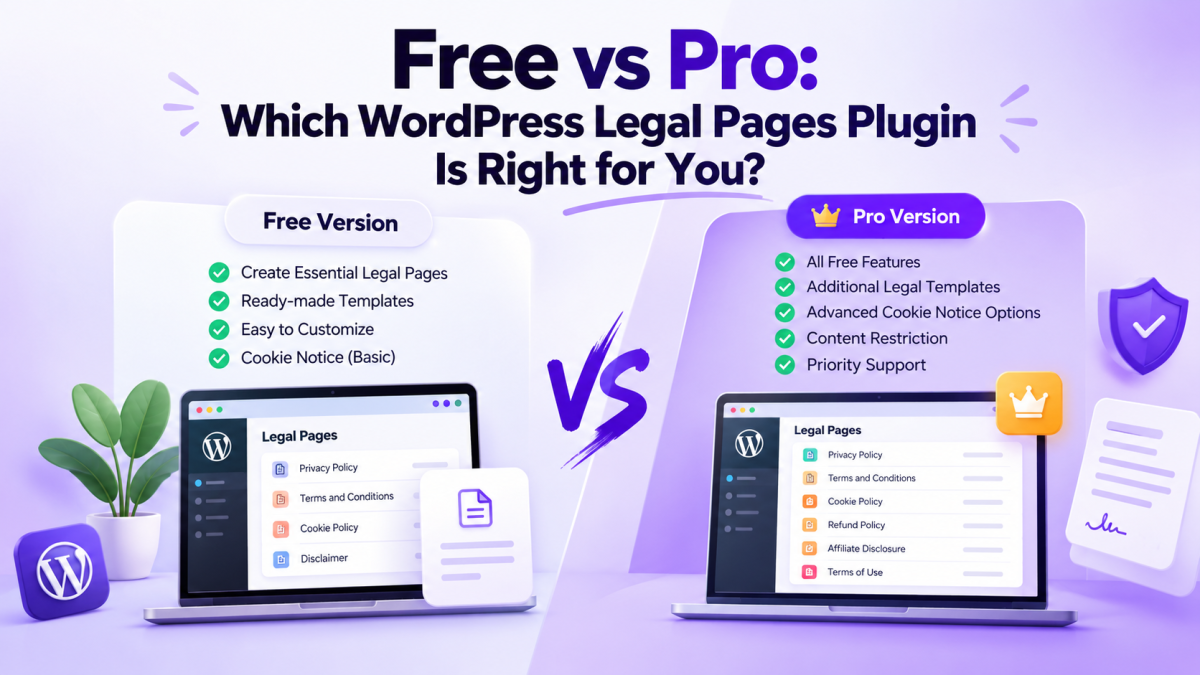
Choosing the right WordPress legal pages plugin can make it easier to create, customize, and manage important legal pages on your website. However, should you start with a free plugin or invest in a Pro version?
The answer depends on your website, the features you need, and how you plan to manage your legal content. A personal blog may need only a few basic legal pages, while an online store, membership website, or growing business may need additional templates and more control over cookie notices.
In this guide, we’ll compare Legal Pages Free and Pro, explain their main differences, and help you decide which option is right for your WordPress website.
What Is a WordPress Legal Pages Plugin?
A WordPress legal pages plugin helps website owners create and manage legal documents without building every page from scratch. These documents may include Privacy Policies, Terms and Conditions, Cookie Policies, Disclaimers, Refund Policies, and other website-related policies.
Creating these pages manually can take time, especially if you are unfamiliar with the information each document should cover. A plugin with ready-made templates provides a starting point that you can customize for your website.
Legal Pages by wpWax offers free and Pro versions. Both help users create legal pages directly from the WordPress dashboard, while Pro adds more templates and advanced features.
Legal Pages Free vs Pro: What’s the Difference?
The main difference is the range of available templates and features.
The Free version is a useful starting point for websites that need essential legal pages. The Pro version is designed for users who need additional templates, more cookie notice options, content restrictions, and extra support.
Here is a quick comparison:
| Feature | Free Version | Pro Version |
|---|---|---|
| Ready-made legal templates | Yes | Yes, with additional templates |
| Create and edit legal pages | Yes | Yes |
| One-click template insertion | Yes | Yes |
| Custom legal templates | Yes | Yes |
| Shortcodes | Yes | Yes |
| Cookie notice bar | Yes | Yes, with additional options |
| Advanced cookie notice features | Limited | Additional options available |
| Legal popups | Basic features available | Additional options available |
| Restrict content until terms are accepted | Limited or unavailable, depending on feature | Available |
| Priority support | No | Yes |
Note: Features can change between plugin versions. Check the current Legal Pages plugin listing and Pro product page before making a purchase.
What Can You Do With the Free Version?
The Free version gives you the core tools needed to create and manage legal pages in WordPress. You can start with ready-made templates, customize their content, and publish the pages on your website.
1. Create Essential Legal Pages
You can use available templates to create pages such as Privacy Policies, Terms of Use, Disclaimers, Cookie Policies, and other common legal documents.
These pages help explain how your website operates, how information is handled, and what visitors should know before using your services.
2. Customize Templates in WordPress
You do not need to write every document from a blank page. Select a template, insert it into a WordPress page, and edit the content using the WordPress editor.
You can add relevant business information and adjust the text to reflect your website’s actual practices.
3. Manage Legal Content From One Dashboard
Managing legal content inside WordPress makes it easier to review and update your pages when your website changes.
For example, if you add a newsletter form or introduce a new service, you can review your existing legal pages and update the relevant information.
Who Should Choose Free?
The Free version may be enough if you:
- Run a personal blog or a small website.
- Need a limited set of legal pages.
- Prefer to start without paying for a plugin.
- Do not need advanced cookie notices or content restriction features.
You can begin with Free and consider upgrading when your website’s requirements grow.
When Should You Upgrade to Legal Pages Pro?
The Pro version becomes more useful when your website needs more than basic legal page creation.
1. You Need Additional Legal Templates
Different websites have different legal requirements. An affiliate website may need an Affiliate Disclosure, while an online store may need a Refund Policy or other store-related documents.
Legal Pages Pro provides additional templates that can help you cover more specific use cases without starting from scratch.
Before choosing a template, check that it matches your business model and the requirements that apply to your website.
2. You Need More Cookie Notice Options
Websites may use cookies for login sessions, preferences, analytics, advertising, and other functions.
Legal Pages Pro provides additional cookie notice features and customization options. These can be helpful when you want greater control over how notices appear and how visitors interact with them.
Keep in mind that displaying a cookie notice does not automatically make a website compliant. Your consent settings must reflect the cookies and tracking technologies your website actually uses.
3. You Want to Restrict Content Until Visitors Accept Terms
Some websites need visitors to accept certain terms before accessing specific content.
For example, a membership website or a platform offering restricted resources may need visitors to acknowledge its terms before proceeding.
Legal Pages Pro includes a content restriction feature for this purpose. Consider whether this functionality fits your website’s user experience and business requirements before upgrading.
4. You Need Additional Support
When legal pages are important to your business, having access to priority support can be useful.
Pro includes priority support for customers who need help with the plugin. This can be particularly valuable for businesses and agencies managing multiple websites.
Who Should Choose Pro?
Pro may be the better option if you:
- Manage an online store or membership website.
- Need additional legal page templates.
- Want more control over cookie notices and related features.
- Need to restrict selected content until visitors accept terms.
- Manage several websites and need additional support.
Free vs Pro: Which Is Right for Your Website?
The best option depends on what your website needs today and what you expect to need in the future.
Choose Free If You Have a Simple Website
If you run a personal blog, portfolio, or small business website, start by identifying the legal pages you actually need.
If the Free version provides the templates and features required for your website, there may be no reason to upgrade immediately.
Choose Pro If You Need More Control
If you operate an online store, membership platform, affiliate website, or a growing business, you may benefit from the additional templates and features available in Pro.
Review the available features and choose a plan based on your requirements rather than upgrading simply because a paid version exists.
Consider Your Future Requirements
Your website may change over time. You might add new services, introduce membership features, or expand into new markets.
Before choosing a plan, consider whether your current setup will support those changes. You can start with Free and upgrade when you need a Pro feature.
How to Choose the Right Plan
Before deciding between Free and Pro, follow these steps:
- List your required legal pages. Identify the documents relevant to your website and business activities.
- Review the available templates. Check whether the Free version covers your needs or whether you require additional templates.
- Check cookie notice requirements. Review the cookies and tracking technologies used on your website before deciding which features you need.
- Consider your website’s functionality. If you need visitors to accept terms before accessing selected content, check the Pro content restriction feature.
- Compare the current plans. Review the latest pricing, included features, and support options on the official website.
This process helps you choose a plan based on practical needs rather than paying for features you may not use.
Ready to Simplify Your Website’s Legal Pages?
Choose the right Legal Pages plan for your website. Explore ready-made legal templates and useful features to create and manage your WordPress legal pages more easily.
Explore Legal Pages →Frequently Asked Question
Conclusion
Choosing between Legal Pages Free and Pro comes down to your website’s needs.
The Free version is a practical starting point if you need essential legal pages and basic management tools. Pro is worth considering when you need additional templates, more cookie notice options, content restriction features, or priority support.
Start by reviewing your website’s requirements and comparing them with the available features. That way, you can choose the right WordPress legal pages plugin for your current needs and upgrade when additional functionality becomes useful.
Ready to manage your website’s legal pages more easily?
Explore Legal Pages to compare the available features and find the right option for your WordPress website.