 By admin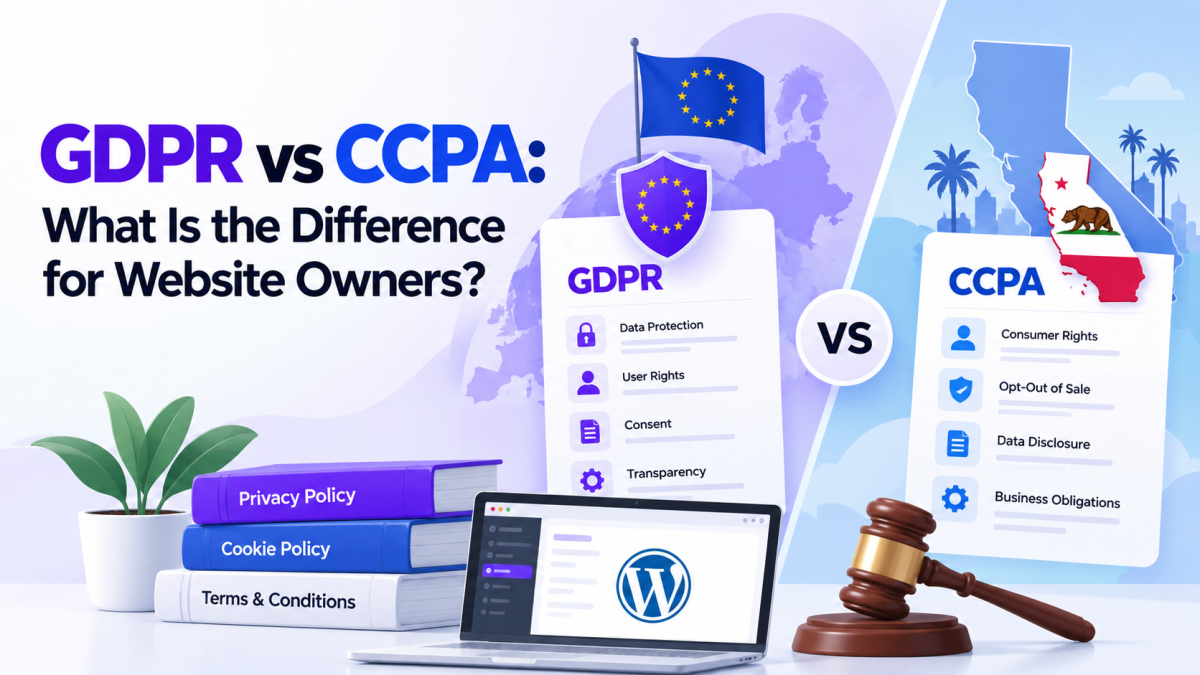
GDPR and CCPA are privacy laws designed to protect people’s personal information. Both laws focus on data protection, but they differ in their scope, requirements, and user rights.
Understanding these differences helps WordPress website owners review their data collection practices and provide clear privacy information. In this guide, we will explain GDPR and CCPA, compare their key differences, and show how to create and manage relevant legal pages using Legal Pages.
Note: This article provides general information, not legal advice. Whether a law applies to your business depends on your specific activities, users, and other factors.
What Are GDPR and CCPA?
What Is GDPR?
GDPR stands for the General Data Protection Regulation. It is a European Union data protection law that regulates how organizations process personal data.
The GDPR can apply to organizations located inside or outside the EU. For example, a business outside the EU may still fall under the regulation if it offers goods or services to people in the EU or monitors their behavior.
Personal data can include:
- Name
- Email address
- IP address
- Location information
- Account details
- Online identifiers
- Other information connected to an identifiable person
The GDPR focuses on principles such as transparency, purpose limitation, data minimization, security, and accountability.
What Is CCPA?
CCPA stands for the California Consumer Privacy Act. It gives eligible California consumers rights concerning the personal information businesses collect, use, and share.
The law includes rights such as:
- Knowing what personal information a business collects
- Requesting deletion, subject to exceptions
- Opting out of the sale or sharing of personal information
- Correcting certain inaccurate information
- Receiving equal treatment when exercising privacy rights
The CCPA was amended by the California Privacy Rights Act (CPRA), which introduced additional privacy protections.
The CCPA does not apply to every business. Its application depends on factors such as the type of business, its size, and how it handles personal information.
GDPR vs CCPA: What Is the Difference?
GDPR and CCPA both address personal data protection, but their approach and requirements are different.
1. Geographic Scope
GDPR: Can apply to organizations inside or outside the EU when they meet the regulation’s conditions, including offering goods or services to people in the EU or monitoring their behavior.
CCPA: Focuses on eligible businesses handling the personal information of California residents. Whether a business is covered depends on the applicable criteria under California law.
A business should not assume that being located outside Europe or California automatically means that these laws do not apply.
2. Legal Basis and Consent
The GDPR requires organizations to have a lawful basis for processing personal data. These bases can include consent, contract performance, legal obligations, legitimate interests, and other grounds listed in the regulation.
The CCPA focuses on consumer rights and business obligations, including the right to opt out of the sale or sharing of personal information in applicable situations.
This means businesses should not treat GDPR consent requirements and CCPA opt-out requirements as if they were exactly the same.
3. Individual Rights
The GDPR provides rights that include access, correction, erasure, restriction of processing, objection, and data portability, subject to applicable conditions.
The CCPA provides rights such as knowing, deleting, correcting, opting out of sale or sharing, and limiting certain uses of sensitive personal information.
The exact process and exceptions can differ, so businesses should establish procedures that match the laws applicable to them.
4. Privacy Information
Both laws make clear privacy information important, but the details that need to be communicated can differ.
A GDPR-focused privacy notice may need to explain information such as the legal basis for processing, data retention, recipients, international transfers, and individual rights.
A CCPA-related privacy notice may need to explain categories of personal information collected, how information is used or shared, and the privacy rights available to California consumers.
A single privacy page may need to cover multiple requirements if a business serves users in different regions.
Why Do WordPress Website Owners Need to Understand These Laws?
WordPress websites often use several plugins and third-party services that collect or process information.
For example, your website may include:
- Contact forms
- Newsletter signup forms
- User registration
- Analytics tools
- Ecommerce plugins
- Payment gateways
- Advertising services
- Cookies and tracking technologies
These features can affect your website’s privacy responsibilities.
A Privacy Policy can explain how your website collects and uses information. However, simply publishing a Privacy Policy does not automatically make a website compliant with GDPR or CCPA.
Website owners should also review their actual data practices, including:
- What information is collected
- Why the information is collected
- Which services receive the information
- How long information is retained
- How users can submit privacy requests
- How cookie and tracking technologies are used
The requirements that apply will depend on the website, its users, and the relevant legal rules.
How to Create a Privacy Policy in Your WordPress Site
Legal Pages provides ready-made templates that can help you create and manage legal pages from your WordPress dashboard.
The following steps show the template creation workflow using the actual Legal Pages interface. The available template and its content should be reviewed to make sure it matches your privacy requirements.
Step 1: Add Your Website Information
Legal Pages provides settings where you can add website and business information.
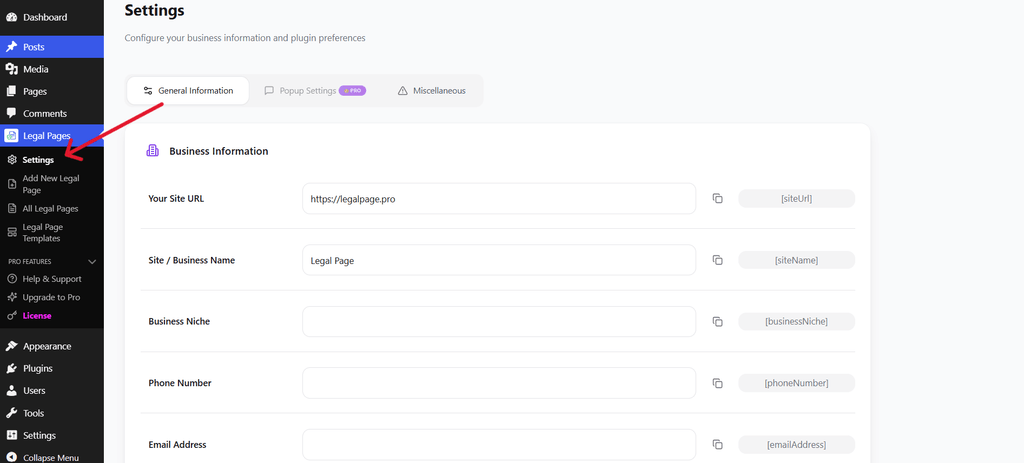
Website and business information settings
You can add details such as:
- Website URL
- Site or business name
- Email address
- Phone number
- Business information
The plugin’s available shortcodes can help reuse saved information in legal page content.
Step 2: Add Address Information
You can also add address information through the settings area.
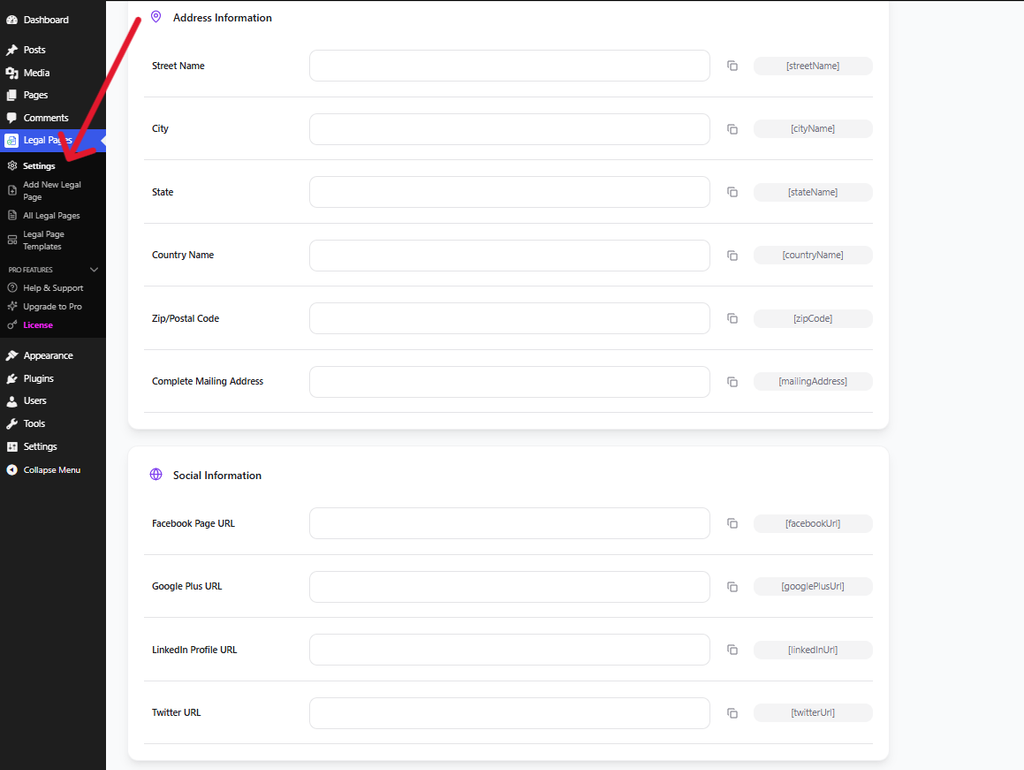
Address information settings
This may include your street, city, state, country, and postal code.
Use accurate and current information in your legal pages, particularly where visitors may need to contact your business about privacy-related questions or requests.
Step 3: Open Add New Legal Page
From your WordPress dashboard, go to Legal Pages → Add New Legal Page.
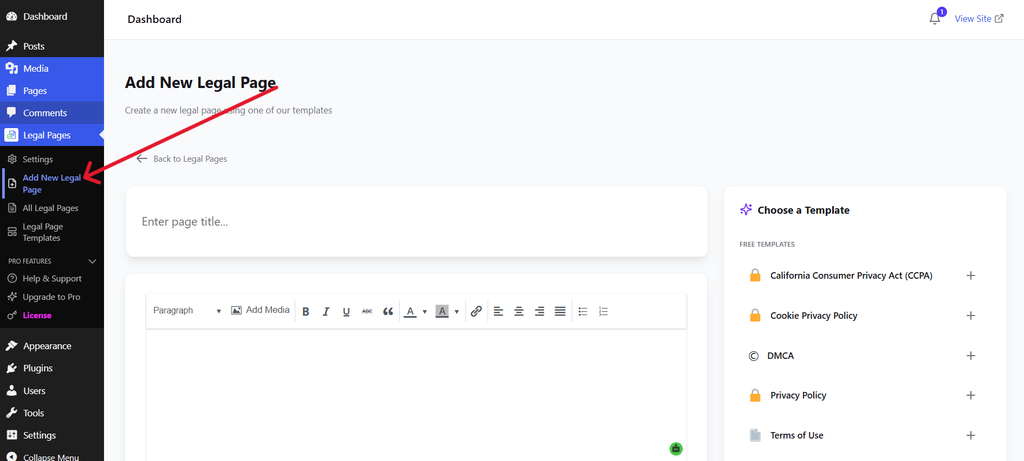
Add New Legal Page screen
This screen allows you to start creating a new legal page and choose a suitable template.
For a website that needs privacy information covering GDPR, CCPA, or both, start by selecting an appropriate Privacy Policy template.
Step 4: Select a Suitable Template
After opening the creation screen, choose the template that matches the legal page you want to create.
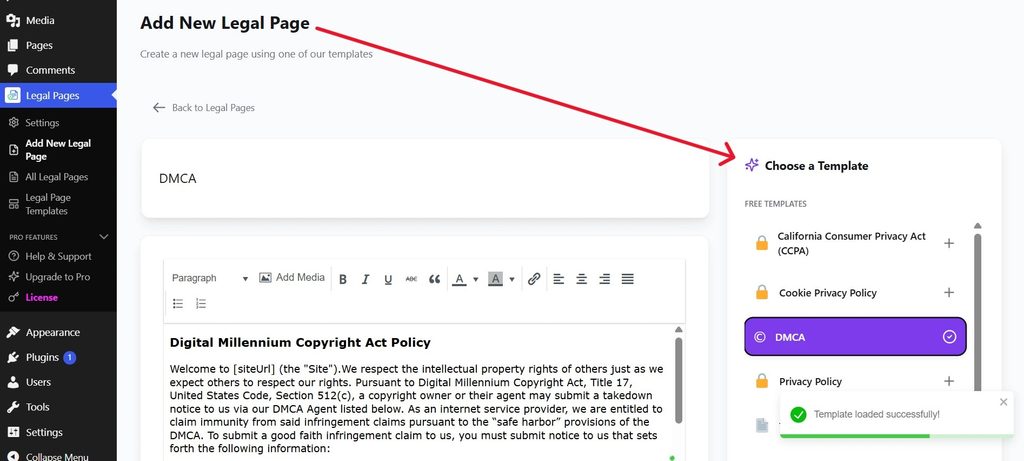
Legal Pages template selection
The screenshot shows the template selection interface. The example displayed is a Terms of Use template, but the same workflow can be used to select an appropriate privacy-related template.
A template provides a starting structure. It does not automatically determine which legal requirements apply to your business.
Step 5: Review and Customize the Content
Once the template is loaded, review its content in the editor.
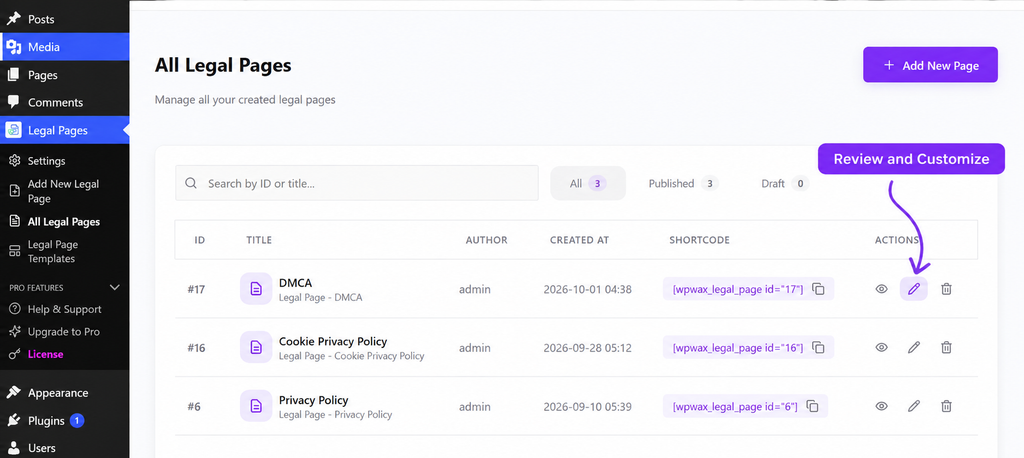
Legal Pages content editor
When preparing a Privacy Policy, check whether the content reflects your website’s actual practices.
Pay attention to:
- Personal information collected
- Contact and registration forms
- Analytics and advertising tools
- Cookies
- Third-party services
- Data retention
- User privacy rights
- Contact details for privacy requests
If your website serves users in different regions, the Privacy Policy may need to address more than one set of requirements.
Step 6: Save and Manage Your Legal Pages
After reviewing and customizing the content, save or publish the page.
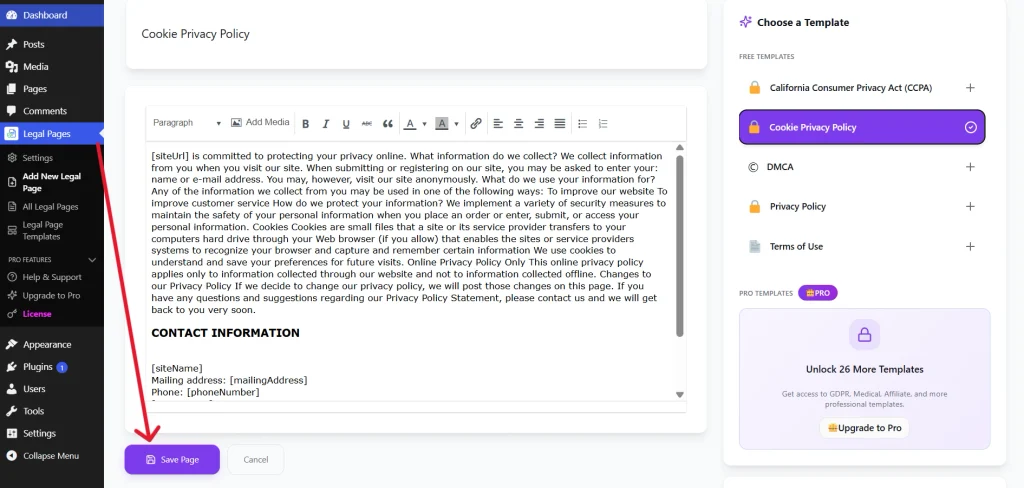
You can manage your created legal pages from Legal Pages → All Legal Pages.
All Legal Pages
After publishing, visit the live page and check that:
- The page loads correctly
- Your business information is accurate
- The policy reflects your website’s data practices
- Visitors can easily find the page
- The relevant privacy information is clearly presented
Create Your WordPress Privacy Policy with Ease
Use Legal Pages to create and customize your Privacy Policy with ready-made templates. Review your website’s privacy information and manage your legal pages from WordPress.
Explore Legal PagesCommon Mistakes to Avoid
Assuming One Law Applies to Every Business
GDPR and CCPA have different scope and requirements. Review which rules apply to your website instead of assuming that one general approach covers every situation.
Treating a Privacy Policy as Complete Compliance
A Privacy Policy is only one part of privacy management. Your actual data collection, processing, security, and user-request procedures also matter.
Ignoring Plugins and Third-Party Services
Analytics tools, payment providers, advertising services, and forms can affect how personal information is handled.
Copying Another Website’s Policy
Another website may collect different information or serve a different audience. Its policy may not accurately describe your business.
Forgetting to Update Privacy Information
Review your Privacy Policy when you add or remove plugins, services, forms, analytics tools, or other features that affect data processing.
Conclusion
GDPR and CCPA both focus on protecting personal information, but they differ in their scope, requirements, and the rights they provide to individuals.
GDPR applies to certain organizations that process personal data connected to people in the EU, while CCPA establishes privacy rights for eligible California consumers. The laws can overlap, but they should not be treated as identical.
For WordPress website owners, the first step is to understand how the website collects and processes personal information. Review your forms, plugins, analytics tools, cookies, payment services, and other third-party integrations.
Legal Pages can help you create and manage legal pages using ready-made templates. However, the content should be reviewed and customized based on your website’s actual practices and the requirements that apply to your business.